Bloom Filters using Guava
What are bloom filters?
Bloom filters are a data structure used in computer science for efficient probabilistic set membership testing. In other words, given a set of elements, a Bloom filter can answer whether an element is not in the set or maybe in the set, but cannot say for sure whether it is definitely in the set.
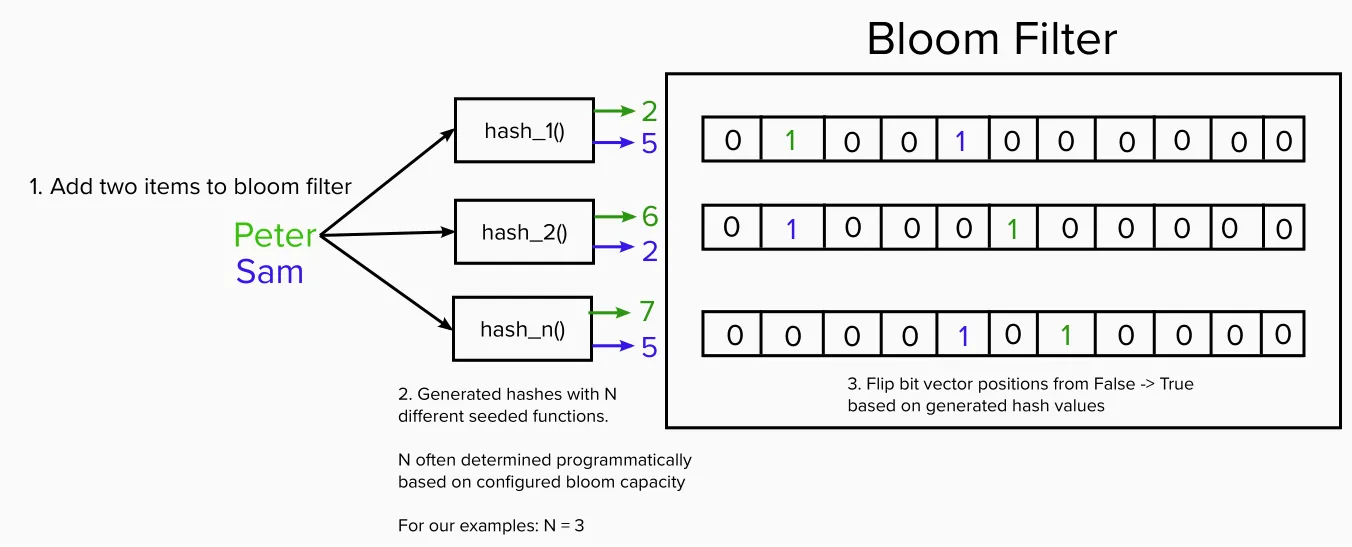
A Bloom filter is a compact data structure that uses multiple hash functions to map elements to positions in a bit array. When an element is added to the set, its hash values are used to set bits in the bit array to 1. When checking if an element is in the set, its hash values are used to look up bits in the bit array. If all of the bits are 1, it is likely that the element is in the set, but there is a chance of false positives (i.e. a bit of information that says an element is in the set, when it is actually not).
To create a Bloom filter, you need to determine the size of the bit array and the number of hash functions to use. The size of the bit array will depend on the expected number of elements in the set and the desired false positive rate. The number of hash functions will depend on the size of the bit array and the desired false positive rate.
Java Implementation
In Java, you can implement a Bloom filter using a library by Google called Guava. Here is an example implementation:
Creating a filter using Guava:
Here we are creating a Bloom filter for up to 1000 Integers and we can tolerate a one-per cent (0.01) probability of false positives.
BloomFilter<Integer> sha256filter = BloomFilter.create(
        Funnels.integerFunnel(),
        1000,
        0.01);
Hashing the string
Here we hash the String to sha256 and get the first 3 numbers
public String sha256hex(String originalString) {
    return Hashing.sha256()
            .hashString(originalString, StandardCharsets.UTF_8)
            .toString().replaceAll("[^0-9]", "").substring(0, 3);
}
Saving the hash in the filter
After we successfully hash the string, we save the hashed number to filter
private void saveToSHA256Filter(String originalString) {
    sha256filter.put(Integer.parseInt(
            hashUtils.sha256hex(originalString)));
}
Checking filter
private boolean checkInSHA256Filter(String originalString) {
    return sha256filter.mightContain(Integer.parseInt(
            hashUtils.sha256hex(originalString)));
}
You can find the implementation here on github.
References
Comments
Join the discussionNo comments yet. Be the first to comment.
